Turn private documents into
AI-ready Markdown
Milldown converts PDFs, Office documents, web pages — even scans — into clean, token-efficient Markdown, entirely on your computer. Contracts, records, research: ready for ChatGPT, Claude or your RAG pipeline, without handing the originals to a converter site.
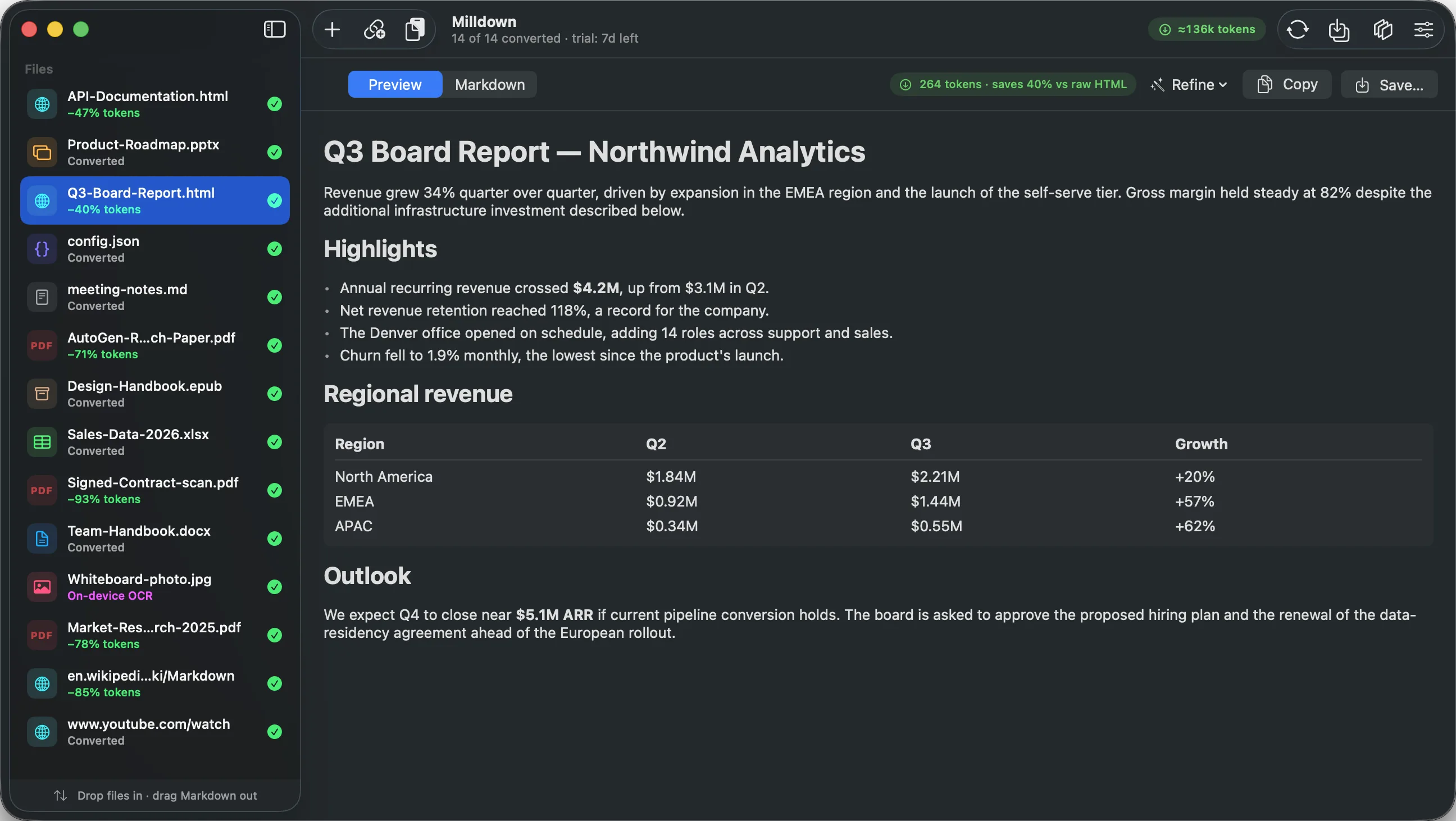
Local files never leave your computer
Web converters upload your contracts, reports, and records to someone else's server. Milldown bundles the entire conversion engine inside the app.
The one exception is opt-in: two Azure features can send a document to your own Azure resource — your endpoint, your credentials. Both are off by default.
Convert once, save on every message
Attach a document to a chat and you don't pay for it once — it's re-sent with every follow-up, so its cost lands on every message in the conversation. That's what makes converting first compound: shrink a PDF by 71–84% and that saving repeats on every turn of every chat that uses it. RAG banks it differently — the document embeds once and queries retrieve only chunks — but lean text is what makes the chunks cheap. On a monthly plan the same saving is headroom: more documents before the usage limit, more room left for the conversation itself.
The entire workflow in one app
Convert → clean → measure → pack → paste. From the window, the menu bartray, FinderExplorer, or your own automations.
Convert anything
PDF, Word, PowerPoint, Excel, EPUB, HTML, notebooks, Outlook messages, images — plus any web page or YouTube transcript by URL. Whole folders become mirrored Markdown trees, watch folders convert new arrivals automatically, and a corrupt file is refused with an explanation instead of becoming binary noise.
Private OCR
A PDF with no text layer, or an image with no text metadata, is detected automatically and read on-device with Apple's Vision framework — the same OCR behind Live Textwith the Windows OCR engine. Scans, photographed contracts, screenshots, paper archives: searchable text, nothing uploaded.
Clean & edit
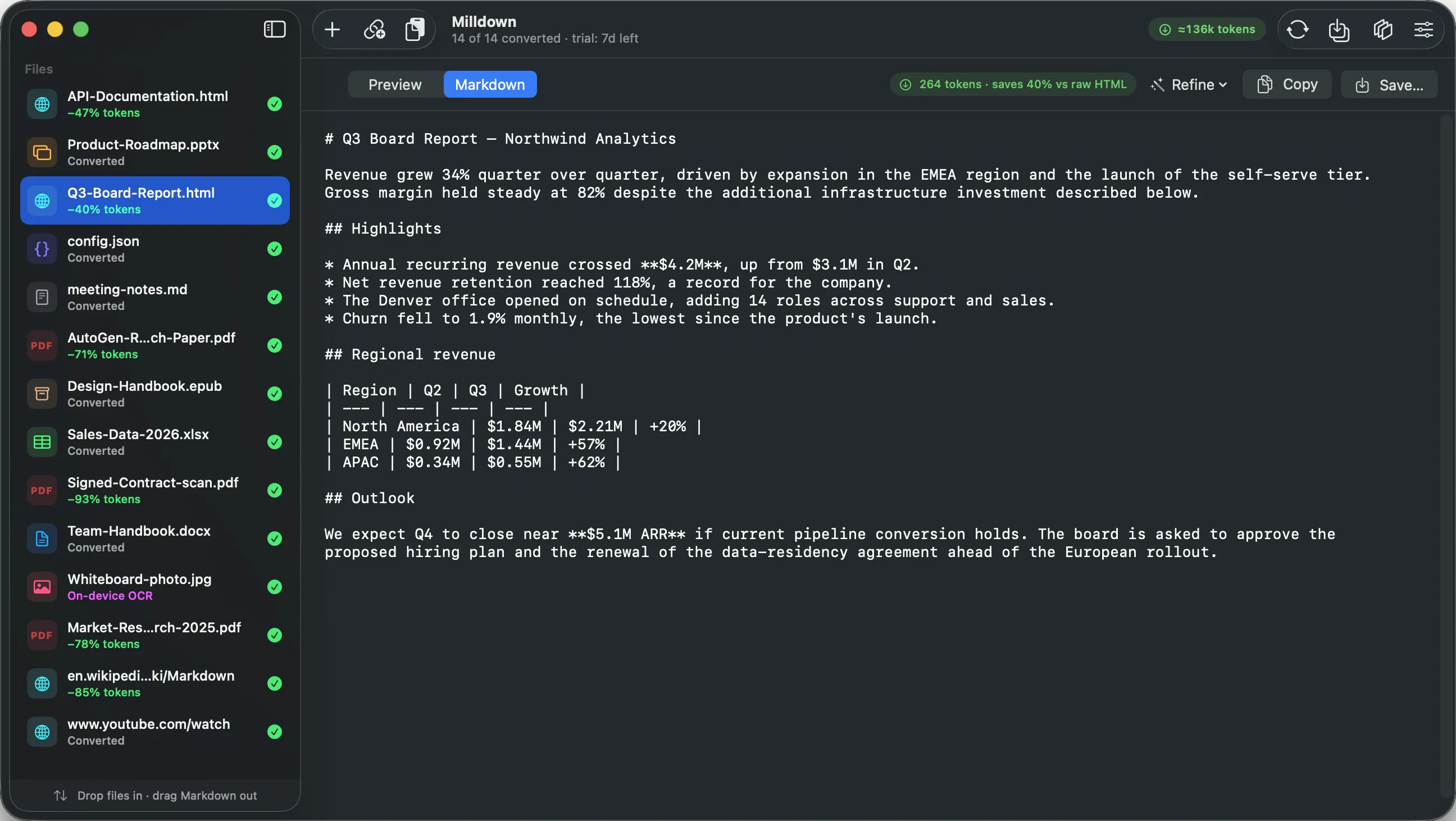
The Clean Up pass strips repeated page headers, footers, page numbers and invisible characters — revertible, and it never touches code blocks. Edit the Markdown in place and watch token counts recompute as you type. Quit and reopen: your session comes back exactly as you left it.
Measure what it saves
A live estimated token count and saving for every file, measured against the raw path it would otherwise take — and silent where no saving exists. See the benchmark methodology.
Package for AI
Merge a folder into one paste-able Context Pack with a table of contents. Split by headings into 512–2,048-token RAG chunks — numbered Markdown files or JSONL. Provenance front matter (source, timestamp, SHA-256) keeps every chunk traceable.
Automate everywhere
Drop on the menu-bar icontray drop window and paste from the clipboard. Right-click any file in FinderExplorer. Drag results straight into Claude or ChatGPT as real .md files. Script it with the milldown CLI or the milldown:// scheme from Shortcuts — with a confirmation step, always.
Twenty-plus individual features under those six groups — see the full list.
Markdown is for more than AI
Plain text is the one format that's diffable, portable, permanent, and readable by everything — including people. Whatever brings you here, the mill is the same.
AI & RAG pipelines
Token-efficient input for Claude, ChatGPT, and your vector store — with chunk export in Markdown or JSONL, and a token count for every file.
Knowledge management
Feed your Obsidian vault or Notion workspace. Watch folders keep a Markdown mirror of everything; YAML front matter carries titles, sources, and dates.
Version control & dev
Docs that diff. Convert a whole folder tree, commit the Markdown mirror, and review document changes in pull requests like code. CLI included.
Archiving
Formats die; plain text doesn't. Provenance front matter records the source path, timestamp, and SHA-256 of every original — each conversion is a citable record.
Publishing
From .docx drafts to Hugo/Jekyll-ready Markdown with publishing front matter. Clean headings, real tables, no pasted-from-Word debris.
Accessibility
A scanned PDF is invisible to a screen reader. On-device OCR turns it into structured, navigable text — without uploading anyone's documents.
Drop it. Mill it. Paste it.
Drop
Drag files or a whole folder, paste a URL, or right-click in FinderExplorer. Batch as many as you like.
Refine
Preview the Markdown, clean up conversion noise, watch the token counter drop.
Paste
Copy into Claude or ChatGPT, save to disk, export chunks, or build a context pack.
Simple pricing
Try everything free for 7 days. Then one perpetual licence — yours forever, no subscription, no account.
- ✓ Every feature, no tiers
- ✓ Personal and commercial use
- ✓ 7-day full trial first
- ✓ 12 months of updates included
- ✓ 14-day money-back guarantee
- ✓ Everything in Milldown
- ✓ 10 seats, assign as you like
- ✓ One invoice, one renewal date
- ✓ Deactivate and move seats freely
- ✓ Priority support
Prices exclude VAT/sales tax, added at checkout where applicable.
Questions
Looking for how something works? The user guide covers every feature in detail.
Does Milldown upload my documents anywhere?
No. Your documents are converted entirely on your computer — including OCR — and are never uploaded. Milldown makes exactly three kinds of network request, none of which carry a file from your disk: fetching a web page or YouTube transcript you explicitly paste, checking milldown.app for updates (and fetching one when you approve it), and verifying your licence key with our licensing service. There's no account and no telemetry, and converting local files works with Wi-Fi off.
Two optional features are the exception, and they're clearly marked as such in Settings: Azure Document Intelligence and Azure Content Understanding send your document to your own Azure resource, configured with your own endpoint and credentials. Milldown neither provides nor proxies either service; the document leaves this computer for Microsoft's cloud under your Azure agreement. Both are off by default.
What formats does it support?
PDF (including scanned), Word (.docx), PowerPoint (.pptx), Excel (.xlsx/.xlsm), HTML, CSV, JSON, XML, RSS/Atom, EPUB, ZIP archives, Jupyter notebooks (.ipynb), Outlook messages (.msg), plain text and Markdown, and JPEG/PNG images — plus any web page, Wikipedia article or YouTube video by URL.
Legacy Office formats (.doc, .ppt, .xls) and Apple formats (.pages, .key, .numbers) need saving as their modern equivalents first. Milldown tells you which one rather than failing silently.
Why won't it convert audio or video files?
Because the only transcription in the underlying engine uploads your audio to an anonymous shared speech API — no account, no key of your own, no terms between you and it. The two Azure features are opt-in precisely because they send documents to your own Azure resource, configured with your own endpoint; there's no equivalent way to do that for audio, so it's disabled rather than quietly shipped. YouTube transcripts are different — those are captions YouTube already published, fetched as text.
How are the token-savings numbers calculated — and why do some files show none?
Locally, with OpenAI's o200k tokenizer as a consistent estimate (absolute counts vary by provider), comparing the Markdown against the realistic alternative for that file type. For PDFs that's native PDF upload, which bills every page as an image as well as text. For web pages it's the raw page source a scraper would ingest. For spreadsheets it's Milldown's CSV mode against its own Markdown-table output.
Some files show no saving. A Word document costs about the same in Markdown as the plain-text extraction any tool would do anyway — claiming 97% by comparing against the raw OOXML inside the file would be measuring against something nobody does. A video has no raw path at all: a transcript is the only way to give one to an LLM. In those cases Milldown shows the token count and explains why there's no comparison.
I'm on a monthly plan, not an API bill — does the saving still mean anything?
Yes, and for most people it's the version that matters. On a fixed plan — Claude Pro or Max, ChatGPT Plus, Copilot, Cursor — a smaller document doesn't reduce an invoice, it buys headroom: more documents before you hit a usage limit, longer conversations before the context window fills, and less of your allowance spent re-sending the same boilerplate on every turn.
The saving is always tokens — and the percentages apply the same way whether you're billed for those tokens or rationed on them.
What does Clean Up actually do?
It strips conversion noise without touching your content: repeated running headers and footers (short lines that appear four or more times, the signature of per-page boilerplate), standalone page numbers, trailing whitespace, invisible characters like zero-width and non-breaking spaces, and runs of blank lines collapsed to one. It never touches anything inside a fenced code block, it tells you how much it removed, and Revert Cleanup restores the original exactly.
Can I use it for RAG and vector databases?
Yes — that's exactly what it's for. Refine ▸ Export RAG Chunks splits on heading boundaries into numbered Markdown files at roughly 512, 1,024 or 2,048 tokens; Export Chunks as JSONL produces one JSON object per line for direct ingestion. Provenance front matter attaches the source path, timestamp and SHA-256 so every chunk stays traceable.
Does it handle whole folders and ongoing work?
Both. Drop a folder and Milldown mirrors the entire tree, subfolders preserved. Watch folders go further: nominate a folder and anything added to it is converted automatically into a "Markdown" subfolder, so a Markdown mirror maintains itself.
Is there a command-line tool?
Yes. Install the milldown command from the app menu and it works anywhere — scripts, Makefiles, CI — with full option parity. Or open a ready-made terminal from the app if you'd rather not install anything system-wide.The installer puts the milldown command on your PATH, and it works anywhere — scripts, Makefiles, CI. There's also a milldown:// URL scheme for Shortcuts and launchersscripts and launchers, which asks for confirmation so nothing converts behind your back.
What does it cost?
Free for 7 days — every feature unlocked, no account needed. Then a $39 perpetual licence covering up to 3 Macs, for personal and commercial use. A $249 Team licence covers 10 seats (details for teams). Prices exclude VAT/sales tax, which is added at checkout where applicable — Stripe, as merchant of record, handles the tax and issues your receipt.
Your purchase includes 12 months of updates. After that the app keeps working forever; renewing simply continues the new versions — $19/year for a personal licence, $99/year for a Team licence covering all 10 seats. Nothing is billed automatically, and no feature is ever switched off. There is a 14-day money-back guarantee.
Which Macs does it run on?
Apple Silicon Macs (M1 and later) running macOS 14 Sonoma or newer. Intel Macs are not supported. The download is around 171 MB because the conversion engine is bundled inside the app — there's nothing else to install, and no Python on your system is touched or required.
What happens when my trial ends?
Conversion stops; nothing else changes. Documents you've already converted stay in the app and on disk, and everything you saved is plain Markdown you own outright. Entering a license key resumes immediately.
What's under the hood?
Conversion is powered by Microsoft's open-source MarkItDown engine (MIT license), bundled inside the app, with Milldown's native macOS interface, on-device OCR via Apple's Vision framework, token analytics, and workflow tools built on top. Milldown is not affiliated with Microsoft.
Download Milldown
Free for 7 days — every feature unlocked, no account, no card.
Download for macOSChecked by Apple and cleared to run — opens on first launch, no security warnings.
bfb8f11ed64f3664522b58fbcbad0b12d6d3d6facfee5e61628792d9ecff541bWindows version coming soon
Same engine, same on-device conversion, built natively for Windows. Leave your email and we'll tell you the day it ships — one email, nothing else.